ReleasesDownload
v0.1.10·
Gaze 0.1.10
Gaze.dmg
98 MB · macOS
What's new
Unlocking
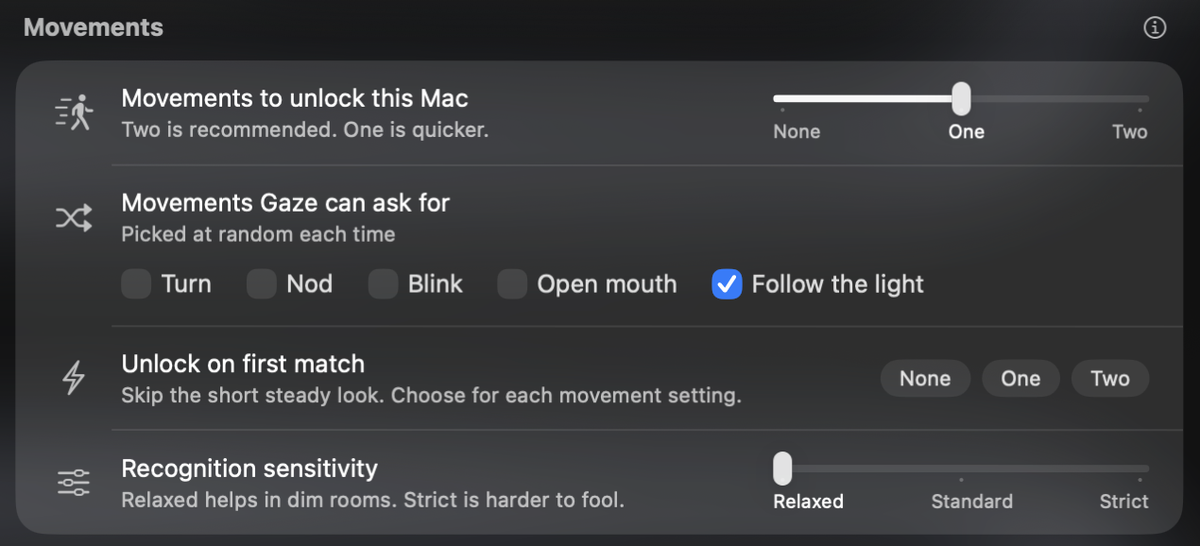
- Unlock on first match: Gaze unlocks as soon as it recognises you, without the short steady look. Choose it separately for no movements, one or two. It's on for none and one to start.
- The panel opens and the camera starts sooner, and locking by hand is faster.
- Follow the light works better for smaller eyes, and Gaze picks another movement when you're too far away for it.
Unlock Attempts
- Attempts are grouped into unlocked, opened another way and left locked.
- Choose when Gaze takes a photo: never, when Gaze doesn't unlock, or every time.
- Close a photo with its X, or by clicking outside it.
Settings
- Movements and security checks have their own Security tab, so Unlock is shorter.
- Pick movements with simple checkboxes.
- Add several apps to App Lock at once.
Thanks
- Ahmed, for the attempt groups, photo choices and adding several apps at once.
- british vanilla, for help with smaller eyes.
Install
Download Gaze.dmg and drag Gaze to Applications, update from Gaze Settings, or run:
brew upgrade --cask gaze
The first time you open Gaze, go to System Settings > Privacy & Security and click Open Anyway.